How to Create a Personal Website in Minutes with a No-Code Builder
Want a personal website that looks professional, gets clients, and takes almost no time to build? You're in the right place. Several times, I've facilitated freelancers and small business owners to go from having nothing to a live site in just one afternoon. Honestly, you can probably do the same.
This guide is like your speedy and hands, on tour of creating a personal website using a no, code builder. I will cut through the fluff, concentrate on the essentials, and assist you in steering clear of the errors by simply indicating the ones that I come across most frequently. In case you are thinking of initiating freelancing, expanding your freelance services, or shifting from full, time to freelance work, this will enable you to establish a genuine online presence by yourself without the need for a developer or a lengthy learning curve.
Read More : Best Freelance Websites for Students (Ranked & Compared for 2025)
Why a personal website matters for freelancers
A LinkedIn profile or marketplace listing helps, but a website is yours. It shows your style, offers proof of work, and gives you a place to collect leads. I’ve noticed that freelancers who have a clean website win trust faster. Clients feel reassured when they can see a portfolio, read a short bio, and find an easy way to get in touch.
Think of the website as a hub. Your social links, case studies, contact form, and things like pricing or packages all belong there. For many of us, a single page or a small site is enough. That makes using a no-code builder ideal.
No-code builders: why they work for freelancers
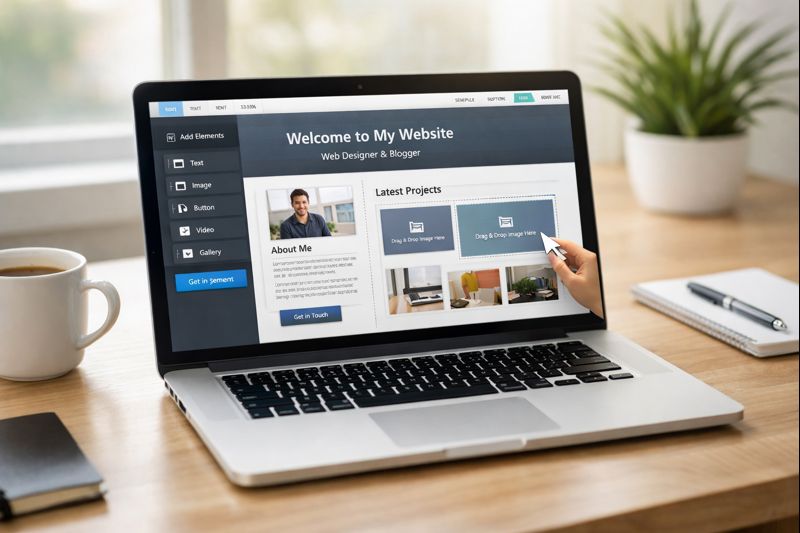
No, code platforms allow users to create without the need for coding. Templates take care of the layout and responsive behavior. Drag and drop controls enable you to replace text and images. You still have to decide on the content and clarity, but the technical friction is almost non, existent.
Some real benefits I appreciate:
- Speed. You can launch the same day.
- Control. Update portfolio items or rates without a developer.
- Cost. Most of the time, it is cheaper than hiring someone to build from scratch.
- Built, in tools. Many include SEO basics, contact forms, and analytics.
If you are first considering freelancing or planning to move from employment to freelancing, a no, code personal website is a fast way to present a credible freelance career. It is also perfect for digital creators, designers, writers, and developers who have to show work samples quickly.
Plan before you click
I always sketch a simple plan before touching the builder. It saves time. Spend 15 to 30 minutes and answer these questions:
- Who is your ideal client? (startup, small business, agency, local shop)
- What services do you offer? Keep it to two or three clear offerings.
- What are the top three portfolio pieces that prove your skill?
- What action do you want visitors to take? Contact, book a call, or buy a package?
Write short answers. For example: "I help early-stage startups with product design. My three best projects are an e-commerce redesign, a B2B dashboard, and a mobile onboarding flow. Primary action is book a meeting."
Why this matters: templates look great, but without clear content you’ll end up with a pretty page that doesn’t convert. Keep content focused. You can always expand later.
Pick the right template
Templates can make or break the first impression. Don’t overthink it. Choose a template that matches your work and industry. Designers and photographers often go for visual-heavy templates. Copywriters or consultants need a template that highlights testimonials and process.
When choosing, look for these features:
- A clean hero section with a headline and short value statement
- Space for portfolio or case studies
- Clear contact area or booking CTA
- Mobile responsive layout
Tip: preview templates on mobile. Many people browse on phones. A template that looks great on desktop but awkward on mobile will cost you clients.
Write a simple, real headline
Your headline should say what you do and who you help. Short and specific wins. Avoid vague phrases like "creative solutions" or "innovative thinker." Use plain language.
Examples that work:
- Designer helping early-stage apps improve onboarding
- Technical writer for developer tools and APIs
- Freelance marketer who grows small e-commerce sales
In my experience, a headline plus one sentence of clarification is perfect. Lead with the headline, then add a short subline that shows a benefit or result.
Build a small set of essential pages
You don’t need a huge website. For most freelancers these pages are enough:
- Home - quick value statement and primary call to action
- About - who you are, short story, and why you care
- Work - portfolio or case studies with outcomes
- Services - what you offer and how clients engage
- Contact - form, calendar link, or email
Keep the copy short. People scan. Bullet lists and bold phrases help. When I advise clients, I suggest focusing on outcomes and process rather than jargon.
Showcase work with simple case studies
Case studies sell better than screenshots. They answer the client’s main question: can you solve my problem?
Each case study should include:
- One-line summary of the client and challenge
- What you did (3 to 5 bullets)
- Outcome or result (numbers if possible)
- A visual example or screenshot
Short example: "Redesigned checkout for an e-commerce startup. Reduced abandoned carts by 18 percent in two months." See how that tells a story? You don’t need a long essay. Simple beats fluffy.
Clarify services and pricing
Telling clients how you work makes hiring easier. Offer a few clear options: hourly, fixed-price packages, or retainers. If you’re uncomfortable listing prices, give starting ranges. Saying nothing about price leads to extra discovery calls and time wasted.
Simple pricing example:
- Quick audit - 2 hours - starting at 5,000
- Project package - design + handoff - starting at 45,000
- Monthly retainer - ongoing support - starting at 1 lakh
Note: adapt numbers to your market and experience. Clients appreciate transparency. It filters out mismatches and brings in serious inquiries.
Make contacting you frictionless
Don’t hide how to reach you. I’ve seen great freelancers lose work because the contact link was buried or the form was broken. Offer multiple ways: email, contact form, phone, and a calendar booking link for people ready to talk.
If you use a calendar booking integration, make sure your time zone is clear. If you prefer discovery calls, add a short pre-call form to filter leads. Ask one or two qualifying questions so you’re not wasting time.
Pick a domain and connect it
A domain name is small but powerful. Use your name or a short brand name. If you’re a developer or designer, your name dot com or dot in is often fine. For local freelancing in India, consider dot in or dot in variants if global options are taken.
Registering and connecting a domain usually takes 10 to 30 minutes. No-code builders often guide you through DNS settings. If you get stuck, support chat can help, or your domain registrar’s knowledge base has step-by-step instructions.
Optimize for search and discovery
You don’t need an SEO degree to get practical results. Focus on these basics:
- Page titles and meta descriptions should feature the words "freelancing", "freelance services", or "freelance work" if they relate to the content.
- Put up well, structured articles that contain such keywords as "freelancing for beginners" and "how to start freelancing" used naturally in the text Draft short blog posts or guides that provide solutions to the most common questions of clients
- Put links to your social media accounts and mention the location if you are targeting local clients
Example: a short blog post titled "How to Start Freelancing as a Designer" can help people to find you and prove your proficiency. I have witnessed simple posts generating steady traffic which then converts into inquiries.
Use images that support your message
Images matter but they should help tell your story. Use screenshots of work, brief process diagrams, or photos of you at work. Avoid generic stock photos that look like corporate templates. If you must use stock, pick images that feel honest and real.
Quick tips:
- Compress images to keep page load times low
- Use captions to explain what clients are seeing
- Label images with alt text for accessibility and SEO
Include clear calls to action
Every page should point people to the next step. A contact button, a "book a meeting" CTA, or a short lead magnet offer works well. Place the primary CTA in the hero area, in the work section, and in the footer. Repeat it without being annoying.
For example, on the home page the CTA might say "Book a meeting" and link to your calendar. On case studies the CTA could be "See similar work" or "Start a project."
Analytics and simple tracking
Put in rudimentary measures to essentially gauge what aspect is producing the desired result. Google Analytics or an alternative that is considerate of privacy gives you the ability to track visitors, page views, and conversion actions. I established event tracking for contact form submissions and calendar bookings. Therefore, I am able to find out which pages lead to new business.
Setup tip: establish a goal for contact form submissions and another one for calendar bookings. After a few weeks, you will be aware of the pages that need to be optimized.
Common mistakes and ways to avoid them
Here are some things I keep seeing. Skip them and save time.
- Overdesigning. Too many animations and fonts distract from the work. Keep it simple.
- No clear outcome. Focus on what clients get, not just your skills.
- Missing contact options. Include at least one form and one booking link.
- Broken links and images. Test everything on mobile and desktop before sharing.
- Ignoring performance. Large images and slow scripts kill conversions.
If you want a quick checklist, test these before you launch: page load under three seconds, mobile layout intact, contact form working, domain connected, and analytics recording visits.
How to write copy that converts
Good copy is clear and client focused. Avoid long paragraphs and self-centered language. Instead of "I have 10 years of experience," try "I help SaaS startups reduce onboarding time by 30 percent."
Keep sentences short. Use bullets for process steps. Add a single personal detail in the About page so clients know who they might work with. For example, "I used to run a small design agency, so I get budgets and timelines." That small line gives credibility.
Launch checklist
Here’s a quick pre-launch checklist I use with freelancers:
- Proofread all copy and double-check dates and numbers
- Ensure mobile and desktop look good
- Test contact form and calendar links
- Compress images and run a speed test
- Connect your domain and confirm SSL is active
- Install analytics and set conversion goals
Ship it. Perfect is the enemy of done. You can always refine copy and swap case studies later.
Promote your new site
Launching is just the start. Here are practical ways to get traffic and inquiries:
- Share the site on LinkedIn and Twitter with a quick story about a recent project
- Update your email signature with the site link
- Post a short blog or a walkthrough of a case study to show process
- Reach out to past clients with a personalized note and your new site
- Use niche job boards or freelance platforms and link to your site
One simple tactic I recommend: write a short post about how you solved a specific problem in a project. Post it with screenshots and a call to action to book a meeting. That kind of content converts because it shows work and results.
Turn your site into a lead machine
To generate consistent freelance work, treat the site as a system. Monitor which posts or case studies bring traffic. Double down on formats that work. You can add a simple lead magnet like a checklist or template in exchange for email to build a small mailing list.
Example lead magnet ideas:
- Onboarding checklist for product designers
- Email templates for client outreach
- Quick audit checklist for marketing sites
These are small, actionable items that show value and encourage contact. I’ve seen people land projects from readers who downloaded a single checklist.
Use testimonials effectively
Good testimonials are social proof. Short quotes with a name, title, and company is enough. If you can add a metric, even better. For instance: "Worked with Raj on our website. Conversion rate improved 25 percent within one month."
Place them near the work section or the contact CTA. Testimonials that tell a story about the outcome convert best.
When to hire help
No-code builders are great, but sometimes you hit limits. Hire help if:
- You need custom integrations or complex back-end work
- SEO or performance issues need specialist attention
- You want a custom brand identity redesign
Even if you hire someone, a no-code prototype will save money and time. Build the first version yourself, then hand it off with clear notes about what needs changing.
Examples for common freelance roles
Here are quick, real-world templates to give you ideas. Keep them short and adapt to your niche.
Designer
- Hero: "Product designer helping early-stage startups build delightful onboarding"
- Work: 3 case studies with before and after images and metrics
- CTA: "Book a meeting"
Writer
- Hero: "Copywriter for SaaS growth teams. I write landing pages that convert"
- Work: Links to published pieces, short snippets, and performance metrics
- CTA: "Email me your brief"
Developer
- Hero: "Freelance full-stack developer building fast web apps"
- Work: Live links to deployed projects and GitHub samples
- CTA: "Schedule a technical call"
Writers and designers often worry they need long portfolios. You don’t. Focus on three strong pieces and provide context for each.
Common questions freelancers ask
How long does this take? If you have content and a few images ready, you can go live in a few hours. I’ve launched sites in under a day for new freelancers.
Do I need a blog? Not necessarily. A few targeted posts that answer client questions help with SEO. Start small and add posts when you have client questions you answer often.
Which builder should I pick? Pick one that feels intuitive and includes hosting. If you want help picking, check whoozit for examples and support resources. The goal is to minimize friction so you can focus on work, not the platform.
Keeping your site fresh
Update your site every few months. Add new projects, update testimonials, and change your featured services as you learn more about your market. Even small updates signal that you are active and available.
One tactic I use is a quarterly review. I look at analytics, note which pages got traffic, and refresh copy or add a new case study. That habit keeps the site relevant and helps with search.
How this supports your freelance career
A clear personal website makes freelance work easier to start and grow. It helps you appear credible, filters out mismatches, and gives clients an easy way to say yes. When I coach people shifting careers to freelancing, building a simple site is always step one. It’s low cost and high impact.
If you’re exploring freelancing for the first time, think of the site as your brochure and intake form in one place. If you’re already freelancing, it’s the hub that helps you scale and get repeat business.
When No, Code Is a Smart Choice and When It Becomes a Scaling Issue
No, code can be a smart choice when speed is more important than perfection. If you are starting your freelance career, validating services, or quickly need a professional online presence, no, code builders allow you to go live in a few hours instead of weeks. They are great for simple portfolios, service pages, landing pages, and websites at the very early stage where the traffic is low, and the need for customization is minimal. Nevertheless, no, code may become a scaling liability as your business grows.
When traffic increases, SEO requirements become more complex, or you need deep customization, complicated integrations, or performance optimization, you may feel limited. A lot of founders decide to launch quickly with no, code, get their first results, and then experience issues with site speed, structured content, or flexibility. At this point, rebuilding or migrating becomes inevitable. The main thing is to know that no, code is a tool for the launch, not always a long, term architecture, and to plan your growth accordingly. Short real, world example I have seen founders creating their first website on a no, code builder in a single afternoon. It helped them to get clients, build confidence, and generate revenue. But once their blog traffic grew, they wanted more control over SEO, custom layouts, and faster site speed.
A quick real-world scenario
A fast no, code website launch is something I have regularly seen. Founders have gone from nothing to a live client, getting website in a single afternoon. This gave them the confidence to go further, and the cycle just grew itself. However, after the increase in their blog traffic, they desired more refined SEO control, custom layouts, and faster performance. The very tool that gave them a quick start was now holding them back. The wise decision did not involve completely ditching no, code but rather strategically using it and then making the jump when the business needed more.
Final thoughts and quick launch plan
Here’s a quick plan you can follow today:
- Decide your headline and three services
- Choose a template and connect your domain
- Add three case studies and a clear CTA
- Set up analytics and test contact methods
- Share your site and follow up with past clients
It sounds basic because it is. Basic works. You want a site that shows you can do the work, that you’ve done the work before, and that makes it easy to hire you.
Helpful Links & Next Steps
Ready to get your site live?
If you'd like a quick walkthrough or feedback on your first draft, I’m happy to help. Book a meeting and we’ll go through your layout, headline, and case studies together.
FAQs
1. What is a no-code website builder?
A no-code website builder is a tool that allows you to create websites without writing any code, using drag-and-drop elements and pre-built templates.
2. How long does it take to build a personal website with a no-code builder?
You can create a basic personal website in minutes, while a fully customized website may take a few hours depending on content and design.
3. Do I need technical skills to use a no-code website builder?
No, these builders are designed for beginners. You only need basic computer skills to drag, drop, and customize elements.
4. Can I make my website mobile-friendly using a no-code builder?
Yes, most no-code builders automatically make your website responsive for mobile, tablet, and desktop screens.
5. Is it possible to connect my own domain to a no-code website?
Absolutely. Most platforms allow you to connect a custom domain, ensuring your website looks professional and branded.
6. Are no-code websites SEO-friendly?
Yes, many no-code builders include SEO tools like meta tags, alt text, and site maps to help improve your website’s visibility.
7. Can I add features like contact forms or blogs to my personal website?
Yes, no-code builders usually offer widgets and integrations for contact forms, blogs, galleries, e-commerce, and more.