Website Visitor Identification for B2B Sales
This post explains how B2B teams can identify website visitors, discover the companies behind anonymous site sessions, and turn them into qualified opportunities. It covers common techniques (IP-to-company mapping, reverse DNS, browser fingerprinting, form enrichment, intent signals), why it matters (prioritize outreach, power ABM, measure demand), and a simple playbook: track, score intent, enrich, segment outreach, and measure. The author details how to read intent, write respectful outreach, avoid frequent mistakes (overreliance on IP, ignoring privacy, generic messaging, siloed data), metrics to track, a 30-day pilot, and practical tool-selection guidance, including an example vendor, Whoozit.
You get traffic. Lots of it. But most of it walks away unknown. That used to be normal. It does not have to be anymore. Modern platforms like Whoozit help businesses understand which companies are visiting their website and convert that traffic into real sales opportunities.
In this post, I explain what website visitor identification is, why it matters for B2B teams, and how you can turn anonymous visits into qualified sales opportunities. I will walk through common techniques, show how to read buying intent, share practical playbook steps for SDRs and marketing teams, and flag mistakes I see companies make all the time.
I have worked with marketers and sales teams who thought anonymous website visitor identification was magic. It is not. It is a set of practical tools and tactics. When you combine the right signals with a good process, you can see which companies are looking at your product, prioritize outreach, and increase conversion without annoying people.
What is website visitor identification?
Website visitor identification is the process of discovering who is visiting your site at the company level. We do not always learn the specific person. Instead, we identify the company, industry, or account behind an anonymous session. That is usually enough to act on it inside B2B sales and ABM programs.
Think of it this way. You have a lead when someone fills out a form. You have an opportunity when someone from a target account has multiple sessions, reads pricing pages, and downloads product documentation. Visitor identification helps you connect the anonymous sessions to accounts so you can treat those sessions like leads.
Why it matters for B2B businesses
B2B buying cycles are long and involve teams. The people researching your product are often not ready to give their contact information. They want to compare options quietly. That does not mean they are not buyers.
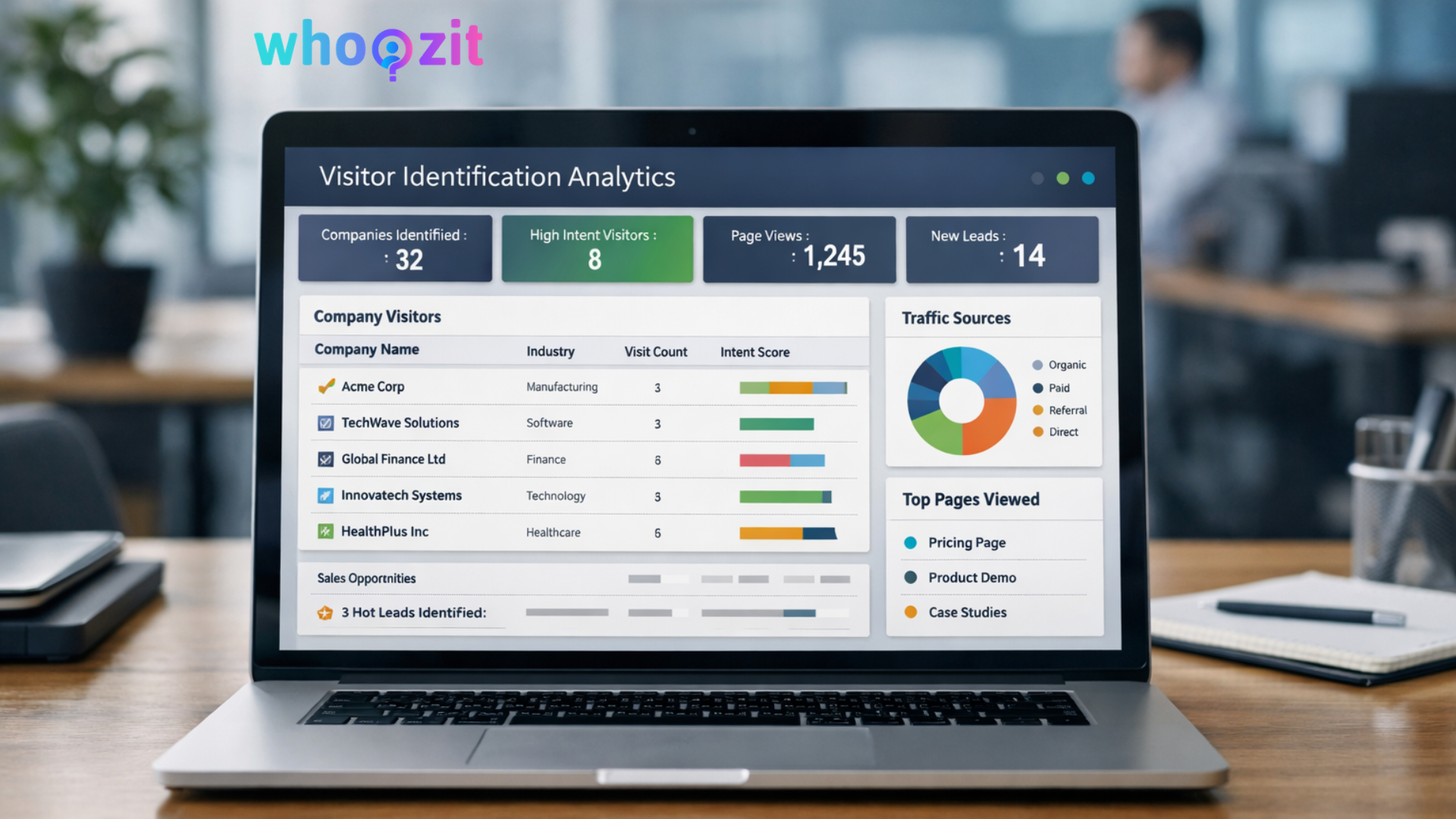
Many B2B teams are now investing in technologies that reveal account-level intent signals. If you want to explore more strategies on identifying high-intent website visitors, check insights on the Whoozit blog.
Finding which companies are researching you gives you three advantages
- Prioritize outreach. Focus on accounts that show real intent.
- Fuel ABM. Customize messaging when you already know the account.
- Measure demand. Discover new segments that are interested in your solution.
In my experience, teams that ignore anonymous visitors miss low friction opportunities. They wait for inbound form fills and leave warm leads to a competitor that reached out earlier.
How visitor identification works in plain terms
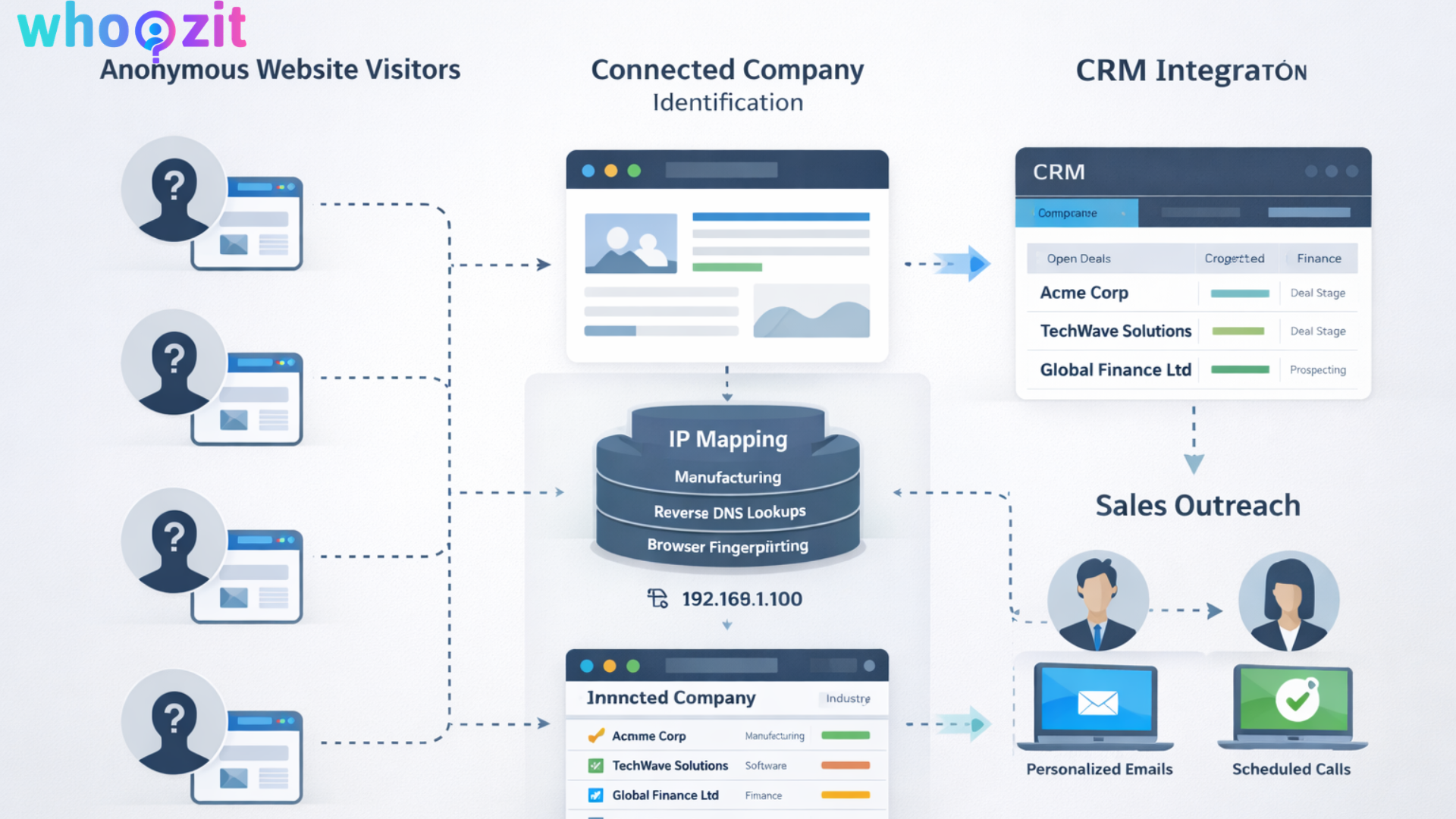
At a high level, website visitor tracking tools link multiple signals to an account. Here are the most common signals and how they are used.
IP to company mapping
Website visitor tracking tools combine multiple signals such as IP mapping, behavioral data, and session activity to identify companies visiting your website. These tracking systems help convert anonymous traffic into actionable sales intelligence.
You can learn more about this process in our article Website Visitor Tracking: Turn Anonymous Traffic into Leads.
This method works well for larger organizations with static IPs. Small businesses that use cloud services or dynamic IPs are harder to match.
Reverse DNS and hostnames
Sometimes, reverse DNS records or hostnames reveal the company. This is another clue used alongside IP mapping. It adds confidence for accounts that are otherwise hard to match.
Browser fingerprinting and cookies
Fingerprinting means gathering non personal attributes from a browser, such as user agent, fonts, and plugins, to create a unique signature. Cookies and first party identifiers help track return visits. Together, they let you link multiple sessions to the same anonymous visitor.
Use fingerprinting carefully. Privacy rules and browser changes can reduce reliability. Consent is important too. If a user blocks tracking, you should respect that.
Form enrichment and progressive profiling
When someone completes a form, we can enrich the basic contact details with company information from firmographic databases. That converts a bare form fill into a qualified account with industry, size, and revenue estimates.
Progressive profiling helps reduce friction. Ask for just enough information to move a lead forward. Then, enrich the rest automatically.
Third party intent and behavioral signals
Intent data comes from a variety of sources. It may include content consumption across the web, searches for product categories, and downloads. Combining on site behavior with off site intent gives a fuller picture of whether an account is actively evaluating solutions.
CRM and enrichment data
Match the identified companies with your CRM. That shows if the account is already in your pipeline, the deal stage, and past touch points. This prevents duplicate outreach and ensures SDRs have context.
Common techniques used by tools to identify companies visiting your website
Different vendors will prioritize different methods or combine several. Here are the typical techniques I see in tools that identify companies visiting your website.
- IP lookup using public and proprietary databases
- Reverse DNS and AS number mapping
- Fingerprinting with cookies and local storage
- Contact form enrichment using data providers
- Matching logged in user data across sessions
- Cross device clustering when available
- Third party intent data and topic signals
Putting these together increases accuracy. One signal on its own is often noisy. Multiple signals used together give you confidence.
How to read intent and prioritize accounts
Not every identified account is equally valuable. You need a simple rubric to score accounts and prioritize outreach. Here are the signals that matter most.
- Page depth. How many pages did they visit
- Page types. Did they hit product, pricing, integrations, and case studies
- Repeat visits. Are they returning over several days or weeks
- Time on key pages. Longer sessions on technical docs often mean deeper research
- Traffic source. Paid campaigns or referrals from industry sites can signal intent
- On site actions. Demos requested, white papers downloaded, pricing viewed
- Firmographics. Are they targeting company size or industry segments
Combine these into an intent score that feeds your SDR queue. In my experience, a simple weighted score works better than a complicated model. Complexity looks smart on paper, but slows down action.
Simple playbook to convert anonymous visitors into leads
A playbook helps your marketing and sales teams act on identified companies. Here is a straightforward sequence that I have seen work.
- Track and identify. Choose a website visitor tracking tool and get baseline data.
- Score intent. Use a small set of signals, like pages viewed and visit frequency, to create a priority list.
- Enrich accounts. Match identified accounts to CRM and add firmographic data.
- Segment outreach. Create messaging for high priority accounts, mid priority, and low priority.
- Sales touch. SDRs reach out with a short, personalized message referencing the page they viewed.
- Marketing nurture. Add lower priority accounts to tailored email nurture sequences and ads.
- Measure and repeat. Track conversion from visit to sales meeting and refine signals.
Small example. A company from the finance sector reads your pricing and integrations for two days in a row. You match them to a target account that is not in the CRM. An SDR sends a short note that references the integration page and asks a single useful question. That small step can turn a quiet researcher into a demo booking.
How to write outreach that does not annoy
When you know a company visited your website, outreach works best if it is specific and helpful. Here are the rules I follow and teach teams.
- Be brief. Mention the page they viewed and why it matters to their role.
- Add value. Share a short insight, a case study link, or an offer to answer a single question.
- Ask one question. Keep the call to action small, like scheduling a quick 15 minute call.
- Avoid sounding like a stalker. Do not enumerate every page they visited. One or two specifics are enough.
- Personalize at the account level. If you know team size or stack, lean on that to make the message relevant.
Example outreach script. Hi there, I noticed someone from Company X viewed our pricing and integration page. We helped a similar finance team reduce processing time by 30 percent. Would you be open to a quick 15 minute call to see if that could fit your needs?
Common mistakes and how to avoid them
I have seen the same pitfalls over and over. They slow down teams and reduce conversion. Here are the top mistakes and how to fix them.
Relying on IP mapping only
IP mapping is useful but limited. It gives false positives when employees work from home or when cloud providers mask company IPs. Combine IP signals with browser fingerprints and form enrichment for better accuracy.
Ignoring privacy and consent
Privacy rules matter. If you do not present a clear cookie consent and respect opt outs, you risk legal issues and annoyed prospects. Always show consent banners when required and choose tracking methods that comply with privacy regulations.
Sending generic outreach
One size fits none. Generic messages kill response rates. Use the page context to craft short messages that sound human. If you cannot personalize outreach at scale, prioritize a smaller list and focus on quality.
Not integrating with CRM.
If visitor data lives in a silo, you will miss opportunities. Push identified accounts and intent scores into your CRM. That creates a single source of truth for sales and marketing.
Too many notifications for SDRs
Bombarding reps with low signal alerts creates fatigue. Use clear thresholds and weekly summaries for low priority accounts. Only escalate high intent accounts immediately.

Privacy and compliance reminders
Identify companies, not people. This helps you stay on the right side of privacy laws in many regions. Still, you must respect local rules around tracking and data retention. Here are practical points to follow.
- Show cookie consent prompts when required
- Keep personal data out of the identification process unless you have consent
- Allow easy opt out of marketing communications
- Document your data retention policies
- Work with legal if you plan to combine on site tracking with third party intent data
In my experience, privacy friendly approaches build trust and still give you the signal you need at the account level.
Metrics that matter
Track the right metrics so you know your visitor identification work is working. Here are the metrics I recommend measuring.
- Identified the company count per week. How many companies can you now see that you could not see before
- High intent account count. Accounts above your intent threshold
- Conversion from identified visit to sales meeting
- Pipeline value influenced by identified accounts
- Response rates to account specific outreach
- False positive rate. How often was the identified company incorrect
Look at trends, not absolute numbers. Early on, you will want to validate that identified accounts are real and that outreach moves them through the funnel.
Practical implementation checklist
Start simple. You do not need all the bells and whistles on day one. Here is a pragmatic checklist to get going.
- Pick a website visitor tracking tool that integrates with your CRM
- Install the tracking script and confirm it does not conflict with your site
- Set up IP and reverse DNS based identification
- Enable form enrichment to capture firmographic data
- Define intent signals and set scoring thresholds
- Map workflows to CRM and assign owners in sales and marketing
- Create a simple outreach template for SDRs
- Run a pilot for 30 to 60 days. Measure and refine
Start with the accounts you already want to win. A small pilot gives you quick learnings and builds support across the org.
Use cases across marketing and sales.
Website visitor identification supports many B2B activities. Here are realistic examples that companies use day to day.
- SDRs receiving prioritized lists of accounts visiting pricing pages
- Marketing launching planet level ABM campaigns for accounts that visited a product demo page
- Demand generation teams identifying new market segments based on repeat content views
- Customer success spotting potential churn risk when existing accounts research competitor pages
- Product teams seeing which features attract interest across industries
These are not theoretical. I have seen a small SaaS company double its qualified demo bookings simply by acting on identified companies that repeatedly viewed their case studies and integrations.
How to choose a tool for B2B website visitor tracking
There are many options in the market. When you evaluate tools, ask these practical questions.
- Does it identify companies reliably across corporate and cloud IPs
- Can it enrich form fills and sync with our CRM
- Does it provide intent signals at the page level, such as pricing or docs viewed
- Will it integrate with our ABM and ad platforms for account based journeys
- How transparent is its data source and matching logic
- Does it comply with local privacy laws and support consent flows
- What support and onboarding does the vendor provide
Trial the tool with a small set of pages and a short pilot period. That helps you verify the accuracy and see the workflow impact on SDRs and marketers.
Why choose Whoozit for identifying high intent companies
Whoozit focuses on turning anonymous B2B traffic into usable account intelligence. They combine IP mapping, behavior signals, and firmographic enrichment into a feed you can act on. I like that Whoozit aims to keep the process simple for teams who want fast results.
Key strengths I look for
- Actionable intent signals that highlight pricing, product, and integration views
- CRM integration that reduces manual work for SDRs
- Focus on ABM use cases such as account scoring and segmentation
- Privacy aware implementation that keeps personal data out of the identification pipeline
If you want to try a focused pilot to see which accounts are investigating your product, Whoozit is built for that workflow. It reduces the time from an anonymous session to a qualified sales opportunity.
Example pilot plan you can run in 30 days
Run a lean pilot to prove value quickly. Here is a simple 30 day plan I have used with small teams.
- Week one. Install tracking script and connect to CRM. Confirm data flow and basic matches.
- Week two. Turn on intent scoring for a handful of key pages, such as pricing, integrations, and API docs.
- Week three. Route high intent matches to two SDRs for outreach. Track response rate and meetings booked.
- Week four. Analyze results. Look at conversion rate, false positives, and pipeline influence. Adjust thresholds and messaging.
Keep things simple. Focus on quality over quantity. If you get three meaningful meetings out of a small pilot, that is a win and a strong case to scale.
Common questions teams ask
Below are quick answers to questions I hear often.
1. Can you identify visitors from small companies or freelancers?
Identification for small businesses is harder. Many use cloud providers or consumer IPs. You will still catch some, but the accuracy improves with company size and stable corporate networks.
2. Will this invade privacy?
Your goal is to identify companies, not individuals. Respect consent and the rules in your jurisdictions. Use transparent cookie notices and do not try to infer personal identifiers without consent.
3. Does it work with single page applications and modern site frameworks?
Yes, in most cases. Make sure the vendor supports your site framework and that events are fired correctly for page changes. Test key pages to confirm tracking works as expected.
4. How do we measure ROI?
Track meetings booked and pipeline influenced by identified accounts. Compare deal velocity and win rate for deals that came from identified accounts versus standard inbound leads. Even small improvements in conversion can justify the investment.
Final thoughts
Website visitor identification is a practical way to get more from the traffic you already have. It will not solve all your pipeline problems. But when you combine good signals, respectful outreach, and strong process, it will add predictable value to both marketing and sales.
If you are running an ABM program, trying to scale SDR outreach, or just trying to make the most of the people who visit your site without filling out forms, visitor identification belongs in your toolbox. Start small. Measure. Iterate. The insights you gain are often surprising and useful.
Helpful Links and Next Steps
If you want help getting started, book a Meeting Today, and we can walk through a short pilot plan tailored to your website and ideal customer profile. Small experiments tend to produce the fastest learning.